

You’re driving a Toyota Corolla rental on an open stretch of New Zealand road when you spot the cruise-control buttons, but aren’t sure which one to press. It’s a common point of hesitation: steering-wheel controls can look different between Corolla models and years, and cruise control isn’t suited to every road. Knowing how to use cruise control on a Toyota Corolla rental starts with identifying the system in your car and understanding how to set and cancel it.
This guide walks you through the basic controls, setting and adjusting your speed, and the difference between conventional and adaptive cruise control. You’ll also learn when to switch the system off and take manual control, especially on narrow or winding roads where conditions can change quickly. The aim is simple: help you feel more confident with the car’s controls before you set off, so you can focus on driving safely and enjoying the journey.
Key Takeaways
- Before setting off, locate the cruise controls while parked and check the dashboard indicators so you know what the system is doing.
- For how to use cruise control on a Toyota Corolla rental, follow the controls and steps in the owner’s manual for the specific vehicle.
- Set cruise control only after reaching a suitable steady speed, then use the correct controls to adjust or cancel it.
- Keep cruise control for steady conditions; stay in manual control when traffic, visibility, road conditions or hazards call for frequent adjustments.
- Get familiar with the car before joining busy traffic to make the drive feel more straightforward and controlled.
How Toyota Corolla cruise control helps on a rental drive
Cruise control can make a suitable, steady-speed stretch feel more comfortable by maintaining a speed you select, rather than requiring constant pressure on the accelerator. It can be useful when traffic is flowing consistently and the road gives you time to monitor what’s ahead. It doesn’t guarantee fuel savings, and it’s not a substitute for attentive driving. Think of it as assistance with speed, not a way to switch off from the drive.
The exact controls and functions depend on the Corolla’s model year and trim. Some systems maintain the speed you set; others may also offer adaptive cruise control, which can adjust speed to help maintain a gap from the vehicle ahead. Don’t assume every Corolla has the same system—a variation familiar to vehicle leasing and fleet management specialists like Fleetsauce when assessing car specifications across different model years. Learning the difference is a useful first step in understanding how to use cruise control on a Toyota Corolla rental.
What cruise control does, and what it does not do
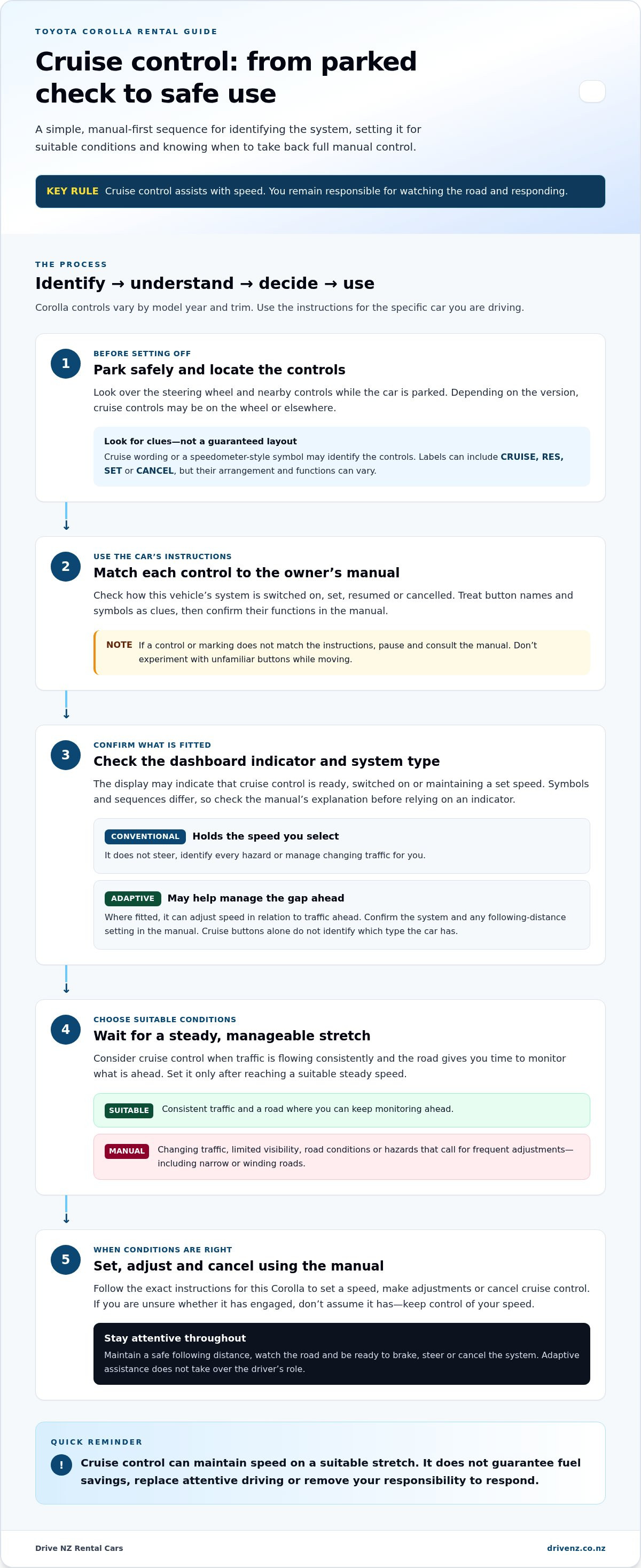
Conventional cruise control holds the driver-selected speed when conditions allow. It doesn’t steer the car, identify every hazard, or manage changing traffic for you. You remain responsible for keeping a safe following distance, watching the road and responding to other drivers. Adaptive cruise control, where fitted, can help regulate speed in relation to traffic ahead, but it still doesn’t take over the driver’s role. For a broader overview of the different systems, see What is cruise control?
Why rental drivers should identify the system first
Controls and indicators can differ between Corolla versions, so avoid relying on button layouts you remember from another car. While parked, look over the steering-wheel controls and dashboard indicators, then consult the owner’s manual for the exact instructions. Don’t experiment with unfamiliar buttons while moving; take a moment to get comfortable before joining traffic.
A brief familiarisation also helps you decide whether cruise control suits the drive ahead. On a consistent stretch, maintaining a set speed may reduce the need to keep adjusting the accelerator. In changing traffic or on roads that demand frequent speed changes, manual control may be the more practical choice. If you’re still getting used to driving on the left, prioritise understanding the car and the road over using any assistance feature.
The same calm preparation applies when choosing a vehicle for a trip. Drive NZ Rental Cars offers compact hatchbacks, intermediate sedans and compact SUVs, and its rental fleet guide provides broader context for comparing vehicle types. Whichever car you drive, take time to identify its controls before setting off. That small step can make the rental journey feel more familiar and help you stay focused on the drive.
Find the Toyota Corolla cruise-control buttons and indicators
Before looking for a particular button, make sure the car is safely parked. Check the steering wheel and nearby controls, then compare what you see with the owner’s manual in the vehicle. Corolla control layouts can change between model years and trims, so a button position or label you recognise from another car may not match this one.
Look for cruise-control wording or a speedometer-style symbol, but don’t press unfamiliar controls to find out what they do. Depending on the version, controls may be on the steering wheel or elsewhere, and the manual is the best guide to their location and operation. This quick check makes the next steps in how to use cruise control on a Toyota Corolla rental specific to the car you’re actually driving.
Recognise the main controls before driving
Some cruise-control systems use labels such as CRUISE, RES, SET or CANCEL. Their exact functions and arrangement can vary, so use these names as clues rather than assuming every Corolla has the same layout. In the manual, match each label or symbol to its function and note how the system is switched on, set, resumed or cancelled. If the markings differ from the instructions, pause and use the manual for that vehicle instead of testing buttons on the road.
Also look for a dashboard or instrument-display indicator. It may show that cruise control is ready, switched on or actively maintaining a set speed, but the symbol, wording and sequence can differ. Check the manual’s explanation of the relevant indicator before relying on it. If you’re unsure whether cruise control has engaged, don’t assume it has; keep control of your speed and refer to the vehicle instructions while parked.
Check whether the Corolla has adaptive cruise control
Adaptive cruise control can help manage the gap to a vehicle ahead as well as maintain a selected speed. Its controls and display may include a following-distance setting, but the layout and operation depend on the car’s year and trim. Confirm the system and distance-setting instructions in the manual before use. The presence of cruise-control buttons alone doesn’t tell you which type is fitted.
Even with adaptive assistance active, you still need to watch traffic and be ready to brake, steer or cancel the system. For New Zealand-specific advice on choosing appropriate conditions, the National Advanced Drivers School’s Safe Cruise Control Practices in New Zealand offers useful guidance. Driver-assistance features support your decisions; they don’t make them for you.
Use a simple parked check before setting off: locate the controls, read the relevant manual section and identify the dashboard indicator. If you’re planning a trip and comparing vehicle types, you can also explore Drive NZ rental options as part of getting ready for a more confident journey.
How to set, adjust and cancel cruise control in a Toyota Corolla
The steps below are general guidance, not a substitute for the instructions for your specific car. Corolla controls and cruise-control functions can vary by model year and trim, so use the owner’s manual in the vehicle to confirm which controls apply and what the dashboard indicators mean. If anything differs, follow the manual rather than relying on a button sequence from another Corolla.
Only set cruise control when the road and traffic allow you to maintain a steady speed while staying fully in control. Get familiar with the relevant buttons while parked. Once driving, keep your attention on the road and use a control only when it’s safe to do so.
Set and adjust a cruising speed
Use this sequence as a general guide, and check each step against the manual for your rental. If your version uses different labels or a different activation method, follow its instructions.
- Drive manually until you reach a suitable, steady speed on a road where cruise control is appropriate.
- Activate cruise control using the control identified in the manual. Some systems have a separate main switch or button.
- Use the confirmed SET control to store the current speed, if that is how your model operates.
- Check the instrument display for the indicator described in the manual. Confirm that the system is active before relying on it to maintain speed.
Many systems use RES to resume a previously stored speed, but the way it works depends on the vehicle and whether that setting is still available. Speed-adjustment controls may let you raise or lower the selected speed, sometimes with different results from a brief press and a longer press. Don’t assume how these controls respond. Check the manual first, and make adjustments only when you can do so without taking your attention from driving.
Cancel cruise control and resume when appropriate
Find out how your Corolla cancels cruise control before setting off. Depending on the version, cancellation may use a CANCEL control, the brake pedal, or another method described in the manual. Check whether cancelling also clears the stored speed, since that affects whether RES can call it back later. If you’re unsure, stay in manual control rather than trying to test the function while moving.
Resuming a stored speed can be useful after a temporary interruption, but only use RES if the manual confirms the function and the previous speed is suitable for current conditions. The car may return to that setting, which could be too fast for the traffic or road ahead. Select a safe speed yourself instead if conditions have changed.
Cancel cruise control whenever you need direct speed control, and be ready to brake or steer as the situation requires. Cancelling doesn’t manage the car for you; you remain responsible for your speed and for responding to traffic. Taking a moment to learn the correct sequence is the practical core of how to use cruise control on a Toyota Corolla rental.
When to use cruise control safely on New Zealand roads
Cruise control is best reserved for stretches where your speed can stay consistent and you can still give the road your full attention. Before switching it on, consider the traffic, visibility, road surface and what lies ahead. A clear stretch can change quickly, so be ready to take manual control whenever conditions do.
New Zealand roads can be narrow and winding, and journeys may take longer than a map suggests. That can mean frequent changes in speed and attention, particularly when you’re unfamiliar with a route. Cruise control is a convenience for suitable conditions, not a reason to drive faster or follow more closely.
Situations where cruise control can be useful
An open, relatively straight stretch with steady traffic may suit cruise control, provided visibility is good and you have enough space to respond to other road users. Set a speed that fits the posted limit and the conditions, not simply the highest speed you think the car can maintain. Keep scanning ahead and checking mirrors, and adjust your speed to match traffic flow.
For trips beginning in Auckland or Christchurch, the appropriate moment to use cruise control depends on the road and traffic you encounter after setting off, not on the city itself. Avoid operating unfamiliar controls while moving. For broader local driving preparation, the New Zealand tourist driving safety checklist covers wider considerations for travelling by car.
When to disengage and take manual control
Cancel cruise control when traffic becomes dense, vehicles are close together, or speeds change often. Do the same if you approach a bend, intersection, roadworks, a steep section or a place where hazards may require a quick response. On winding roads, holding a set speed may not suit the changing curves or sightlines. Choose a speed that lets you stay in control, and slow down as the road demands.
Wet, icy or otherwise slippery surfaces call for extra caution because grip may be reduced. In poor visibility or changing weather, conditions can shift before you have much time to react. Use manual control when it gives you better flexibility, and avoid cruise control if maintaining a set speed would distract you from managing the vehicle safely.
For a practical decision, ask yourself: can I maintain a steady speed, see far enough ahead, and respond comfortably without frequent changes? If not, leave cruise control off or cancel it. These are useful judgement calls to keep in mind as you learn how to use cruise control on a Toyota Corolla rental. For more travel planning, explore Drive NZ rental options and choose a vehicle type suited to your journey.
Make cruise control part of a more confident rental journey
A few minutes of preparation can make unfamiliar controls easier to manage once you’re on the road. Before joining busy traffic, get comfortable with the actual vehicle you’re driving. Use its owner’s manual to confirm how cruise control works, and remember that choosing not to use it is always an option if traffic or road conditions don’t feel suitable.
A quick cruise-control familiarisation checklist
While parked, work through these checks before setting off:
- Locate the controls. Match the buttons or switches to the instructions for this specific vehicle.
- Review the manual. Check how to activate, set, adjust and cancel cruise control, as well as what the dashboard indicators mean.
- Find the cancellation method. Know which control or action disengages the system before you use it.
- Choose based on conditions. If traffic, weather, visibility or the road calls for frequent changes, drive manually.
This simple routine helps you learn how to use cruise control on a Toyota Corolla rental without assuming every Corolla has the same controls or functions. It also gives you a chance to settle into the car before you need to make decisions in busy traffic.
Plan the rental vehicle around your New Zealand trip
Cruise-control familiarity is one part of getting ready. Consider the people travelling with you, how much luggage you’ll carry and the kind of route you plan to drive. Drive NZ Rental Cars offers compact hatchbacks, intermediate sedans and compact SUVs, giving you vehicle categories to consider around those practical needs without relying on a particular make or model.
Planning a pickup in Auckland? The Auckland car rental local guide can help you prepare for that part of your journey. For a South Island itinerary, use the Christchurch car hire and South Island guide to think through your trip before you set off. Choose your vehicle category with your passengers, bags and plans in mind, then take time to learn its controls at pickup.
Once you’re familiar with the car, use cruise control only when conditions are steady and appropriate. Keep your attention on the road and take manual control whenever you need to respond more directly. For your next New Zealand journey, explore Drive NZ rental options and find a vehicle category that suits your travel plans.
Set yourself up for a smoother journey
Before your next drive, make vehicle familiarisation part of your travel plan. Allow a little time at pickup to get settled, adjust your seat and mirrors, and understand the controls in the car you’ll be driving. If you’re still wondering how to use cruise control on a Toyota Corolla rental, remember that the matching owner’s manual is your guide to that specific vehicle. You can also choose to leave cruise control off whenever you’d rather manage your speed manually. These practical checks apply wherever you hire a car; for example, international travellers booking through providers such as FMN Rent – Închirieri Auto în România will also benefit from getting comfortable with vehicle specifications and safety guidance before heading out onto open roads.
Planning for winter travel? Snow chains are available for hire from Drive NZ, giving you another practical detail to factor into your trip preparation. Think ahead about your route and what you’ll need, then choose rental options that fit your plans.
Explore Drive NZ rental options for your trip, and take the next step towards a New Zealand journey that feels more organised from the start. With a little preparation, you can set off feeling ready to focus on the road and enjoy the drive.
Frequently Asked Questions
How do I turn on cruise control in a Toyota Corolla?
Use the activation and set sequence in the owner’s manual for that specific Corolla. The controls can differ, so avoid relying on a button position or sequence remembered from another car. As a practical check, look for the manual’s description of the cruise indicator and compare it with the dashboard after setting the system. If the display doesn’t match the instructions, continue driving manually and review the steps when safely parked.
How do I turn off cruise control in a Toyota Corolla?
Use the cancellation method in that Corolla’s manual. A CANCEL control or brake-pedal input may disengage conventional cruise control, depending on the vehicle. After cancelling, check the display so you know whether cruise control is still on or only the set speed has been interrupted. For example, cancel before approaching a junction or entering a busy area, then manage your speed directly rather than relying on the system.
Can I use cruise control in a Toyota Corolla rental?
Yes, if the particular vehicle has cruise control and conditions make it appropriate. Before leaving the pickup area, use the owner’s manual to learn what the indicators mean and how to cancel the system. This is especially useful if you’re adjusting to driving on the left or navigating unfamiliar streets in Auckland or Christchurch. Cruise control doesn’t take responsibility for steering, watching traffic or responding to hazards away from the driver.
Does every Toyota Corolla have adaptive cruise control?
No. Equipment can differ by Corolla model year, trim and market, so the model name alone doesn’t confirm that adaptive cruise control is fitted. Look for the relevant system description in the vehicle’s manual rather than assuming a following-distance feature is available. If the car does have adaptive assistance, treat it as support only: keep space, watch for changes ahead and be ready to brake or take control yourself.
Is it safe to use cruise control on New Zealand roads?
It can be suitable when the road, visibility and traffic are steady, but the driver must still judge conditions. For example, a familiar open-road stretch may be more suitable than a busy approach into Christchurch or Auckland, where traffic can change quickly. Keep within posted speed limits and cancel cruise control if you’re uncertain about grip, visibility or traffic. Follow current local road-safety guidance when planning your drive.
Why won’t cruise control set in my Toyota Corolla?
Check the vehicle’s manual for the correct sequence and review the dashboard messages or indicators it describes. You may have missed an activation step, or a vehicle condition may be preventing the system from setting. Don’t keep testing buttons in moving traffic. Drive manually, find a safe place to stop when practical, then consult the instructions for that Corolla before trying again.
What is the difference between cruise control and adaptive cruise control?
Conventional cruise control maintains a speed selected by the driver. Adaptive cruise control may also adjust speed to help manage the gap to a vehicle ahead. The precise functions depend on the vehicle, so check its manual for what the system can and can’t do. Neither system makes driving decisions for you. Stay alert, judge the traffic around you and be ready to respond yourself.


