

If you’re asking, “do you need GPS hire for a rental car in NZ?”, the answer depends on where you’re going, how reliable your phone setup is and how much backup you want while driving. The simplest option may not be the best fit for your route.
A navigation app is convenient, but patchy mobile coverage in some areas, data use and battery drain can make it less reassuring on a longer drive. A built-in system or standalone GPS may suit some itineraries, while offline maps can help you prepare if you plan to navigate by phone.
This guide compares all three options so you can choose what fits your plans, from getting around Auckland or Christchurch to travelling between destinations. You’ll also find practical ways to prepare maps and devices before setting off. When planning the trip, consider your route and luggage needs as well as your navigation setup.
Key Takeaways
- Whether you need GPS hire for a rental car in NZ depends on your route, preferences and navigation setup.
- Satellite positioning, map data and a navigation device are different things. Understanding the difference helps you choose what to prepare.
- Compare phone apps, built-in navigation and standalone GPS based on convenience, offline preparation and reliance on personal devices.
- Save offline maps where available and enter key destinations before setting off, especially for drives beyond city areas.
- Choose a rental vehicle to suit your itinerary and luggage, then select a navigation method you’re comfortable using.
Need GPS for a NZ Rental Car? Start With Your Trip
No, GPS hire isn’t automatically necessary. The right choice depends on your route, how you prefer to follow directions and how much preparation you’re comfortable doing before you drive. A familiar city stay with a few planned stops may need a different setup from a multi-day itinerary through unfamiliar towns, attractions and accommodation.
If you’re asking, “do you need GPS hire for a rental car in NZ?”, start with your plans rather than assuming every rental needs a separate device. Consider how often you’ll need directions, whether you’re comfortable using a phone for navigation and whether you prefer a dedicated screen. Routes can include motorways, expressways and other road types, so consider the kind of driving as well as the distance.
What does GPS mean when you hire a car?
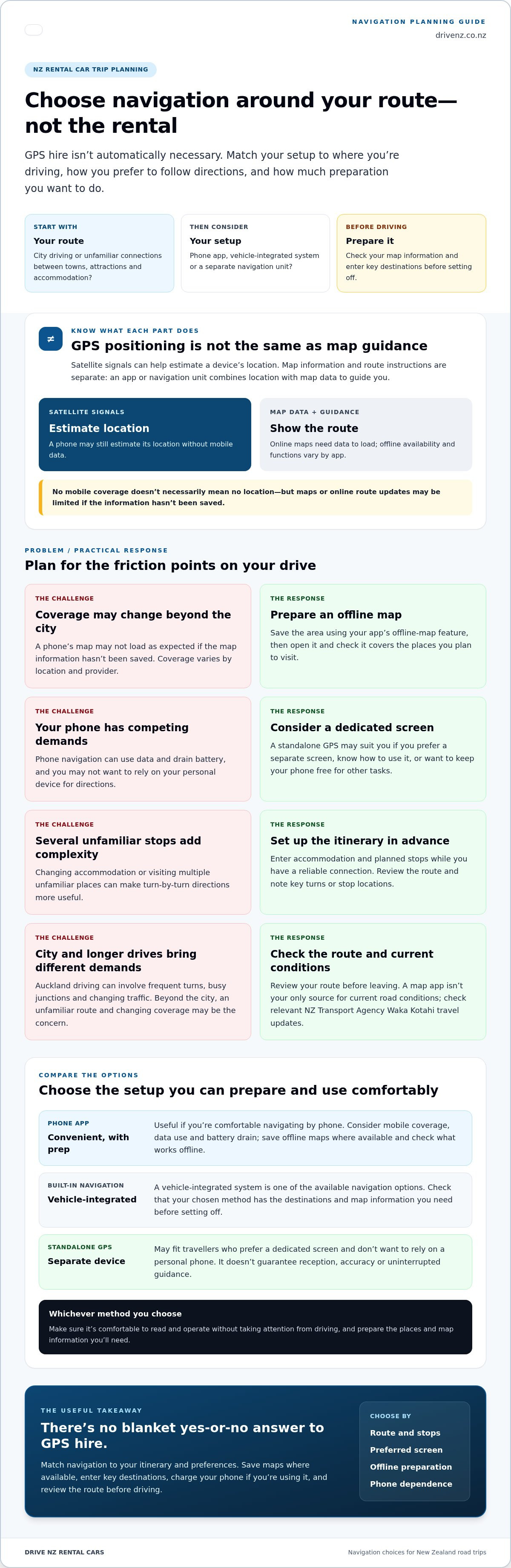
GPS, or the Global Positioning System, uses satellite signals to help determine a device’s location. That’s different from the map and route instructions on screen. A phone app or dedicated navigation unit combines positioning with map information and guidance to help you follow a route.
This distinction matters when planning a rental. GPS describes the positioning technology, not a promise that the car comes with a separate navigation device. You can navigate with a phone app, a vehicle-integrated system or a standalone unit, depending on what you have available and what suits your trip.
When might a separate navigation device be useful?
A standalone GPS may suit travellers who prefer a dedicated screen or don’t want to rely on their personal phone for directions. It can also feel more straightforward if you already know how to use that type of device and want to keep your phone free for other tasks.
Consider the whole setup, not just the device. Think about your route, how many stops you’ll make and whether you’ve prepared the places you need to reach. A separate unit doesn’t guarantee reception, accuracy or uninterrupted guidance, so it’s still sensible to review your route before setting off.
Use these questions to make a practical choice:
- How involved is the itinerary? Several unfamiliar stops or accommodation changes can make turn-by-turn guidance more useful.
- Which screen feels easiest to use? Choose an option you can read and operate comfortably without taking your attention from driving.
- How prepared is your setup? Check that your chosen method has the destinations and map information you need.
- What do you want your phone to do? If you’d rather not depend on it for navigation, a separate device may suit you better.
There’s no blanket yes-or-no answer. Match the navigation method to your itinerary and preferences, then prepare it before you leave. This can make unfamiliar connections between towns, attractions and accommodation feel more manageable without adding equipment you don’t need.
How GPS and Phone Navigation Work on New Zealand Road Trips
Your phone can estimate its location using satellite signals without mobile data. Seeing that position on a map and getting route instructions are separate steps. The app needs access to map information, and some features may rely on an internet connection. Exactly what works offline varies by app, so check its current settings and guidance before your trip.
Losing mobile coverage doesn’t necessarily mean losing your location, but it can affect the map or route guidance you’re relying on. If map information hasn’t been saved to your device, it may not load as expected. Online features, including route updates, may also be limited when the connection drops.
Does GPS work without mobile reception?
Satellite positioning and mobile data do different jobs. A phone may still estimate its location from satellite signals without a data connection, while online maps need data to load. Downloading an offline map in advance can help you access maps beyond reliable coverage, but available functions differ between apps.
Before leaving, open the saved map and check that it covers the places you plan to visit. Don’t assume every route, search or update will work offline.
What changes between city driving and rural routes?
In Auckland, frequent turns, busy junctions and changing traffic can make clear, timely directions useful. On a longer drive beyond the city, the challenge may be an unfamiliar route and changing mobile coverage. Coverage varies by location and provider, so don’t assume your connection will remain steady throughout the journey.
For either kind of drive, review the route before setting off and note key turns or stop locations. A map app can guide you, but it shouldn’t be your only source for current road conditions. Check relevant travel updates from NZ Transport Agency Waka Kotahi before you go, particularly if your plans or route may change.
A few simple checks can make phone navigation easier to rely on:
- Save the map area you need using your chosen app’s current offline-map feature.
- Enter accommodation and planned stops before driving, while you have a reliable connection.
- Make sure your phone is charged and that you can access the saved route without mobile data.
These steps won’t guarantee uninterrupted guidance, but they give you a clearer backup if online map information or route updates aren’t available. If you’re still asking, “do you need GPS hire for a rental car in NZ?”, consider the route and how comfortable you are preparing your phone. Then match the rental vehicle to your itinerary and luggage, and explore rental car options for your trip.
Phone Maps, Built-In Navigation or GPS Hire: Which Suits Your NZ Trip?
Each option can help you follow a route, but the best fit depends on your preferences and preparation. If your phone and a familiar map app are already part of your travel routine, phone navigation may be enough. A vehicle-integrated system or separate GPS may appeal if you prefer a dedicated screen. None is automatically the right choice for every New Zealand drive.
Use this comparison to weigh the practical differences. Built-in systems vary by vehicle, so don’t assume a rental car includes one.
| Option | Setup and offline preparation | Screen and device preference |
|---|---|---|
| Phone navigation | Set up your app and save map areas or destinations where available. | Uses your own phone, so consider its battery and how you’ll position it safely. |
| Vehicle-integrated navigation | Learn the system’s controls and enter destinations before driving. | Uses a screen built into the vehicle, where that system is available. |
| Standalone GPS | Set up the device and route before departure. Offline functions depend on the unit. | Keeps directions separate from your personal phone. |
When phone navigation is a practical choice
A phone is convenient if you already know your app and have saved key destinations. You won’t need to learn a separate interface, but navigation can use battery power, so plan how to keep your phone charged. Prepare map areas in advance if the app supports it, and arrange a suitable secure mount. Don’t assume a rental car includes a phone mount or a connection for your device.
When a separate GPS may suit your preferences
A dedicated unit keeps route guidance separate from calls, messages and other phone tasks. That may suit you if you prefer a separate screen or want to reserve your phone for other uses. You’ll still need to enter destinations and learn the controls. A separate device is an option, not a requirement for every trip.
For a built-in system, use the same practical test: can you enter and review your route comfortably before setting off? Whichever screen you use, take time while parked to understand the instructions and check that the route makes sense. A different interface can take getting used to, even if you’ve used navigation tools before.
So, do you need GPS hire for a rental car in NZ? Choose based on your route, the screen you’re most comfortable following and the tools you already use confidently. If you prefer your phone, prepare it for the journey. If you’d rather use a dedicated device, plan its setup too. Familiarity and preparation matter more than choosing a particular type by default.
How to Prepare Navigation Before Driving a Rental Car in NZ
A few minutes of preparation can make your first drive more straightforward, especially if you’re arriving tired or heading somewhere unfamiliar. Whether you use a phone app or another navigation option, get the route ready while you’re parked and have a reliable connection. Use this checklist to organise the essentials before driving your rental.
Set up maps, destinations and devices in advance
Follow your chosen app’s current instructions to save offline map areas, where available. Add your accommodation, pickup point and planned stops before setting off, then check that the saved map covers the full route. If you’re relying on a phone, pack a charging cable or power bank and have a suitable way to secure it in the car. Don’t assume the vehicle has a phone mount.
- Choose your navigation method. Decide which app, built-in system or separate device you’ll use. Make sure you know how to enter a destination and review the route.
- Save key places. Add your first stop, accommodation and planned breaks. Check each destination, especially if a place has several entrances or similarly named locations.
- Prepare offline maps. If your app supports offline maps, download the areas you need over a reliable connection. Follow its current instructions and check the saved coverage before you leave.
- Plan for power. Charge your phone or navigation device, and bring a charging cable or power bank if needed. A long day of navigation can use more battery than you expect.
- Review the route and alternatives. Look over the main roads, junctions and planned stops. Keep a written note of important addresses or directions as a simple backup.
Check routes and stay focused while driving
Before each day’s drive, review the route and likely stops while parked. Set your destination before moving, and avoid handling a phone or other device while driving. Directions shouldn’t take your attention from the road. Road signs and current travel information matter too, especially if conditions or access change.
If your planned drive includes unfamiliar roads, reviewing the route in advance can help you recognise key turns rather than relying on last-second instructions. The New Zealand tourist driving safety checklist offers further preparation for driving around the country.
Still wondering, “do you need GPS hire for a rental car in NZ?” A prepared phone setup may suit your plans, while another option may feel more comfortable. Once you’ve mapped your route and considered your luggage, choose a rental car for your New Zealand trip.
Plan Your Rental Car and Navigation for an Easier NZ Trip
A smoother road trip starts with two practical choices: a vehicle that suits your passengers and luggage, and a navigation method you’ve prepared before setting off. GPS hire isn’t automatically necessary. Decide whether you’ll use a phone app, a vehicle-integrated system or a separate device, then make sure you’re comfortable with its setup and have your key destinations ready.
Drive NZ Rental Cars has locations in Auckland and Christchurch and offers compact hatchbacks, intermediate sedans and compact SUVs. Think about who’s travelling with you, how much luggage you’ll carry and the roads on your itinerary. Vehicle choice and navigation are separate planning decisions, so prepare your directions independently rather than assuming a particular system or device comes with the rental.
Match your rental vehicle to the journey
Start with passenger numbers and luggage. A compact hatchback may suit a trip with lighter packing, while an intermediate sedan or compact SUV may better fit other combinations of travellers and bags. Focus on the space you’ll need for the whole trip, not just the first drive from the pickup location.
Your route matters too. If you’re planning a South Island journey from Christchurch, think through the distances, stops and luggage you’ll carry between destinations. The Christchurch car hire and road-trip guide can help you consider vehicle hire as part of your wider itinerary. For a broader comparison of the available vehicle categories, use the Drive NZ Rental Cars fleet guide.
Keep your navigation plan practical too. Save accommodation and planned stops in your chosen app where available, prepare offline maps if your app supports them, and make sure your device is charged. If you prefer another type of navigation, learn its controls and enter your route while parked. A little preparation can make it easier to focus on the drive, especially when you’re travelling somewhere unfamiliar.
Book your New Zealand rental with a clear plan
Before booking, gather the details that shape your choice: pickup city, travel dates, vehicle category, passenger and luggage needs, and your main route. This gives you a clear basis for selecting a compact hatchback, intermediate sedan or compact SUV. If you’re still asking, “do you need GPS hire for a rental car in NZ?”, decide based on your route and the navigation method you’ll use confidently, not by default.
Make the vehicle booking and navigation setup separate steps in your trip plan. Choose a rental that fits your journey, then prepare your preferred maps and destinations before driving. When you’re ready, plan a rental with Drive NZ Rental Cars for your New Zealand trip.
Set Yourself Up for a Relaxed First Drive
Your first stretch on the road doesn’t need to be ambitious. If you’re arriving after a flight or collecting the car in an unfamiliar area, leave room in your plans for a calm start. A shorter first leg gives you time to get comfortable with the vehicle and your surroundings before the trip gathers pace.
That’s also a useful way to settle the question, “do you need GPS hire for a rental car in NZ?” Choose the navigation option you feel ready to use, then let your itinerary guide the rest. A good plan should support your trip, not make it feel over-managed. Keep your first destination clear and allow flexibility for breaks or a change of pace.
Drive NZ Rental Cars is a privately owned New Zealand rental operator founded in 2005. When you’re ready to set your plans in motion, plan your New Zealand rental with Drive NZ Rental Cars. With a practical start and a setup that suits you, you can head out feeling prepared and enjoy the journey ahead.
Frequently Asked Questions
Can GPS replace road signs when driving in New Zealand?
No. Treat navigation as a guide, not a substitute for road signs, lane markings or safe driving decisions. Signs may reflect a temporary change, such as a detour or lane closure, that your app hasn’t incorporated. If directions tell you to turn but signs direct traffic around roadworks, follow the signed route and reassess when it’s safe to stop.
Can a passenger adjust the route while the rental car is moving?
A passenger can help manage navigation, provided it doesn’t distract the driver. They could search for a rest stop or enter a revised destination while the driver keeps their attention on the road. The driver shouldn’t handle a phone while driving, including while stopped in traffic. Learner and restricted licence holders must not use a phone while driving, even hands-free, so plan another way to get help with directions.
Does GPS navigation work in tunnels?
Navigation can become less reliable in a tunnel because satellite signals may be blocked or weakened. Your screen may show your last position or the route ahead, but don’t assume it will update smoothly or identify the exact moment to exit. Before entering, note which exit or lane you need, and follow tunnel signs and markings. Once clear of the tunnel, allow the device time to refresh its position.
How can I stop phone navigation from draining my battery?
Start with a full charge and use a compatible in-car charger or a charged power bank for longer drives. Closing apps you don’t need and lowering screen brightness can reduce power use, though the effect varies by phone and settings. Keep the map visible only when useful, and have a passenger check it if you’re travelling together. Set directions before moving so you’re not handling the phone behind the wheel.
What should I do if GPS directions conflict with a road sign?
Follow the road sign and make the next safe choice. An app can lag behind a changed speed limit, closed road or temporary diversion, so don’t make a sudden turn or stop to obey an instruction that conflicts with what you see. If the route still seems unclear, continue to a safe place to pull over, then review the directions before setting off again.
Do I need mobile data for GPS navigation in New Zealand?
Not necessarily for your phone to estimate its position, but map display, searches and route updates may depend on your app and what you’ve saved. If you’re considering whether “do you need GPS hire for a rental car in NZ?”, first check how your chosen app behaves offline and prepare for areas with limited data coverage. This can be useful on drives beyond Auckland or Christchurch, where connectivity may vary by route.


