

Did you know that a driver is four times more likely to be involved in a crash when using a mobile phone? In 2026, New Zealand authorities are stricter than ever, and a simple mistake like holding your device at a red light can result in a $150 fine and 20 demerit points. It's completely natural to feel some anxiety about using phone for navigation in nz rental car, especially when you're balancing unfamiliar road rules with the challenge of narrow, winding rural tracks.
We believe your focus should be on the stunning scenery, not on legal technicalities. This guide helps you master the legal requirements and technical setup for stress-free navigation on New Zealand roads. We'll show you exactly how to stay compliant using secure mounts and hands-free systems. You'll also discover how to use CarPlay or Bluetooth in our modern fleet of hatchbacks and SUVs, along with expert tips for keeping your GPS active in signal dead zones. Whether you're starting your journey at Auckland or Christchurch airport, you'll have the tools to navigate our beautiful country with total peace of mind.
Key Takeaways
- Understand the 2026 hands-free laws to avoid a $150 fine and keep your journey through New Zealand penalty-free.
- Follow our simple steps for using phone for navigation in nz rental car with modern Bluetooth and CarPlay integration.
- Prepare for rural signal black spots by downloading offline maps for reliable guidance across the South Island.
- Learn how to set up your device safely using secure mounts that don't obstruct your view of the road.
- Choose the right vehicle, such as a compact SUV, to ensure your dashboard layout is optimized for clear and easy navigation.
New Zealand Mobile Phone Laws: The Hands-Free Rule
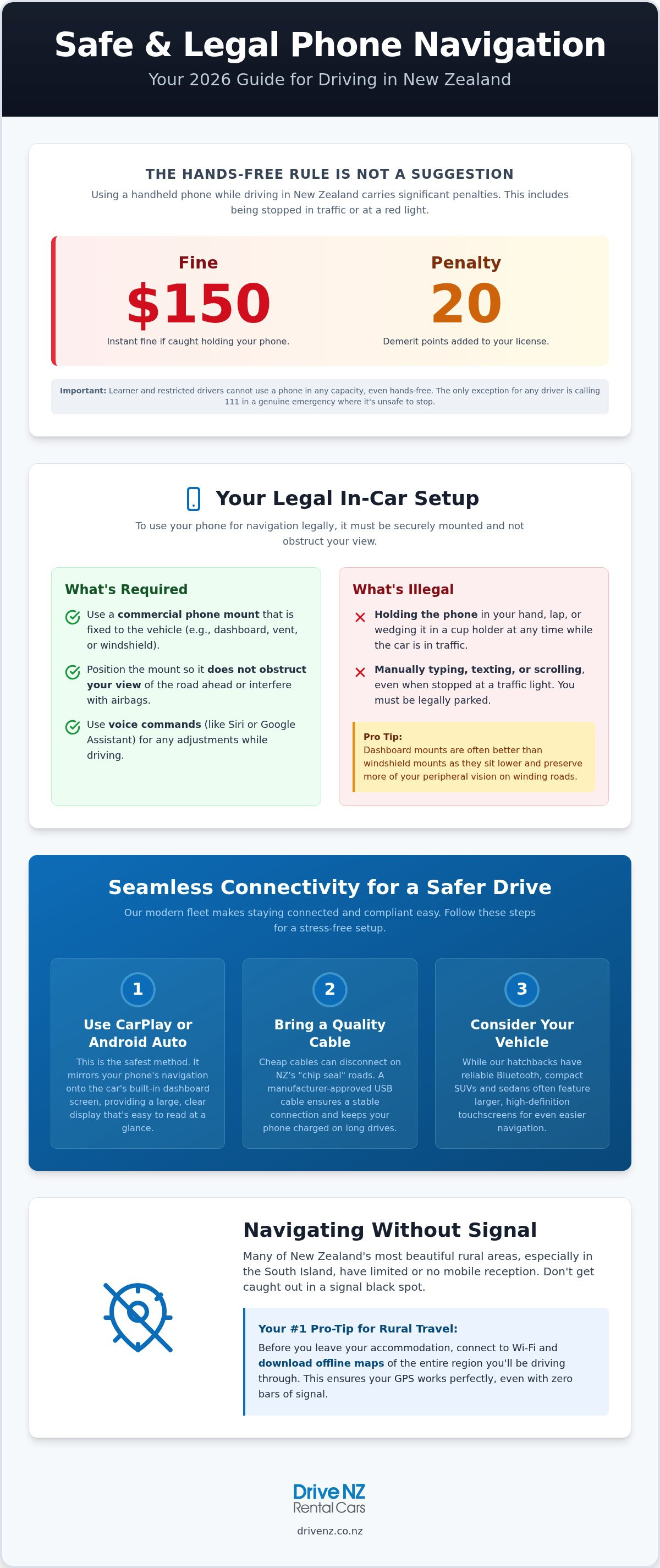
New Zealand’s road safety authorities take a zero-tolerance approach to distracted driving. Since the initial ban in 2009, Mobile phone driving laws in NZ have evolved to address modern technology. In 2026, the rules are clear: you cannot use a handheld mobile phone while driving. This includes texting, making calls, or manually adjusting your GPS. If you're caught, you'll face a $150 fine and 20 demerit points. These penalties apply to everyone, though it's worth noting that learner and restricted drivers cannot use a phone in any capacity, even hands-free.
It's a common misconception that you can check your route while waiting for a green light. Under NZ law, you are "driving" whenever you're in the flow of traffic. This means if you're using phone for navigation in nz rental car while stopped at an intersection or in a queue, you're still liable for a penalty. The law is designed to keep your focus entirely on the road environment. If you need to touch your phone, you must be legally parked with the engine off.
What Qualifies as a Legal Phone Mount?
Waka Kotahi (NZTA) requires that any phone used for navigation be secured in a mounting fixed to the vehicle. This isn't just a suggestion; it's a legal necessity. A legal mount must be a commercial accessory firmly attached to the dashboard or windshield. However, placement is critical. You cannot mount your device in a way that obstructs your forward view or interferes with airbag deployment. We recommend dashboard mounts over windshield suction cups. They often sit lower and preserve your peripheral vision, which is vital on New Zealand’s winding coastal roads. Using phone for navigation in nz rental car is only safe when the device is at eye level and requires only brief, infrequent touches.
Exceptions and Emergency Use
There is only one legal exception for using a handheld phone: calling 111 in a genuine emergency when it’s unsafe to pull over. For everything else, you must rely on voice commands or a passenger. Modern systems like Siri or Google Assistant are your best friends for hands-free adjustments. If you need to enter a new destination manually, find a safe spot to pull over completely. This practice aligns with the NZ Road Code, which emphasizes that safety always comes before speed. Taking two minutes to stop safely ensures you stay on the right side of the law and reach your destination without incident.
Setting Up Your Phone in Your Drive NZ Rental
Stepping into your vehicle at our Auckland or Christchurch airport locations is just the first step of your journey. Before you pull out of the depot, you need to ensure your tech is as ready as the engine. Most modern rentals in 2026 support Apple CarPlay and Android Auto. These systems are superior to basic Bluetooth because they mirror your phone's interface directly onto the car's dashboard screen. This makes using phone for navigation in nz rental car significantly safer and more intuitive.
To get started, simply plug your device into the designated USB port. We strongly recommend bringing your own high-quality, manufacturer-approved USB-C or Lightning cables. Cheap, third-party cables often disconnect when driving on New Zealand's "chip seal" roads, which can be incredibly frustrating when you're following a complex route. Additionally, navigation apps are notorious battery drainers. Because NZ drives often take longer than they appear on a map due to winding terrain, keeping your phone plugged in ensures you won't lose your map in a remote area.
Connectivity Features in Compacts and SUVs
Our Drive NZ Rental Cars fleet is curated with modern travelers in mind. While our compact hatchbacks offer reliable Bluetooth for audio and calls, choosing an intermediate sedan or compact SUV often provides a larger, high-definition touchscreen. These screens are much easier to read in bright sunlight. If you encounter any pairing issues, our local team is on hand at the depot to help you sync your device. Following the NZ Transport Agency rules regarding hands-free setups is much easier when the car’s built-in tech does the heavy lifting for you.
Mounting Your Device Safely
If you prefer using a standalone mount, portable vent clips are an excellent, travel-friendly option. These fit easily into the vents of our hatchbacks and SUVs without causing damage to the interior. Ensure the mount is tightened securely; the vibratory nature of some rural roads can cause loose mounts to fall. During your initial vehicle inspection at pickup, take a moment to test your mount's position. It should be within your peripheral vision but must never block your view of the road or the side mirrors. You can browse our tech-ready vehicles online to see which model best suits your setup preferences.
Navigating Without Signal: Offline Maps for Rural NZ
New Zealand’s dramatic topography is a highlight for any traveler, but it creates unique challenges for digital connectivity. When you're using phone for navigation in nz rental car, you'll quickly find that cellular "black spots" are common in rural areas. The Southern Alps and the West Coast are particularly prone to signal drops where even the best 5G networks fail. Relying solely on cloud-based navigation is risky; if your connection drops while you're halfway through a mountain pass, you could lose your route entirely.
Google Maps remains a reliable choice for its robust offline features, but many travelers supplement it with apps like HereWeGo or Maps.me. These tools allow you to navigate turn-by-turn without any active data connection. Preparing your maps in advance is a key part of following NZ Police road safety advice, as it prevents the distraction and stress of losing your way in a remote area. For finding amenities like public toilets or rest stops in the middle of nowhere, specialized apps like CamperMate are also invaluable because they function perfectly without a signal.
Pre-Trip Download Checklist
Before leaving the Wi-Fi at your hotel or our airport depot, follow these steps to secure your route. In Google Maps, tap your profile icon and select "Offline maps" to choose specific regions like Auckland, Canterbury, or the entire West Coast. A full island map typically requires between 200MB and 500MB of storage space. Once the download finishes, toggle "Offline Mode" in your settings. This preserves your battery and ensures the app doesn't struggle to find a signal while you drive, keeping your focus on the road.
Local SIM Cards vs. Roaming
While international roaming is convenient, local providers like Spark, One NZ, and 2degrees often provide superior rural coverage. You can easily pick up a travel SIM at Auckland or Christchurch airports immediately after clearing customs. Having a local number isn't just about data; it's a practical safety tool. If you need to contact roadside assistance or update a booking while in the heart of the South Island, a local SIM ensures you have the most reliable connection possible. It's a small investment that adds a significant layer of security to your journey.
Road Safety: Using GPS Without Distraction
Safety on our roads goes beyond just avoiding fines. It's about staying alert. When using phone for navigation in nz rental car, you must integrate your tech habits with the NZ Road Code. This means keeping your eyes on the road and your hands on the wheel at all times. If you have a passenger, designate them as the official "Navigator." Let them handle the rerouting, find the nearest petrol station, or zoom in on upcoming intersections. This simple division of labor significantly reduces the cognitive load on the driver and keeps the journey smooth.
Relying on auditory cues is another vital safety strategy for modern travelers. Set your navigation app to speak directions clearly through the car’s speakers via Bluetooth or CarPlay. This allows you to process upcoming turns without glancing down at a screen. Be aware that GPS "Time to Destination" estimates are often optimistic in New Zealand. Our winding, hilly terrain means you'll likely travel slower than the software expects. Always add a 20 percent buffer to your travel time to avoid the temptation of speeding to "catch up" with a digital estimate.
Handling Complex NZ Road Features
New Zealand features road elements that can confuse standard GPS algorithms. One-lane bridges are common in rural areas. While your phone might show a continuous road, you must follow local signage for right-of-way. Similarly, be wary of GPS "shortcuts." These often lead to unsealed gravel roads that are unsuitable for some vehicle types. If you're traveling in winter, your GPS won't always account for alpine pass closures or the need for slower speeds. Ensure you've checked the weather and have your snow chains ready before heading into high-altitude zones. For a vehicle equipped for these conditions, book your rental car with Drive NZ today.
The "Stop and Search" Method
If you need to change your destination or look for a specific landmark, never do it while the car is moving. New Zealand roads often have narrow shoulders with steep drop-offs, making it dangerous to stop just anywhere. Instead, look for "Slow Vehicle Bays" or official rest areas. These are specifically designed for vehicles to pull over safely without obstructing the flow of traffic. Scenic lookouts are also excellent spots to reset your route while taking a break. Correctly using phone for navigation in nz rental car means knowing when to put the device away and focus entirely on the drive.
Choosing the Right Vehicle for Easy Navigation
Your choice of vehicle significantly impacts how comfortably you can manage your route. Different dashboard layouts offer varying levels of support for using phone for navigation in nz rental car. At Drive NZ, we select our fleet with modern connectivity in mind, ensuring that whether you choose a compact hatchback or a larger model, your tech setup remains straightforward. A well-designed dashboard allows you to place your mount at eye level, which is essential for maintaining focus on our unique road conditions.
Compact SUVs are often the preferred choice for those exploring the South Island. The elevated driving position provides superior visibility over winding mountain passes, and the higher dashboard height makes it easier to glance at GPS directions without taking your eyes off the road for long. Conversely, our intermediate sedans are excellent for long-distance cruising. These models often feature the most advanced integrated infotainment screens, allowing for a seamless CarPlay or Android Auto experience that feels like a natural extension of your phone.
Auckland and Christchurch Airport Convenience
We understand that you want to get moving as soon as you land. Picking up your Christchurch car rental is designed to be a quick, efficient process. Our staff are locals who know the tech in our cars inside and out. If you're having trouble with Bluetooth pairing or need advice on the best place to secure your mount, just ask. Our Auckland airport service is equally streamlined, ensuring you spend less time in the depot and more time enjoying the drive. We make sure you're connected and confident before you pull out onto the main road.
Final Checklist for Your Navigation Setup
Before you start your engine and head toward your first destination, run through this quick final checklist to ensure a stress-free trip:
- Mount Secured: Is your device at eye level and firmly attached?
- Cable Connected: Are you using a high-quality cable to prevent mid-drive disconnections?
- Offline Maps Downloaded: Have you saved the maps for your entire route to handle signal dead zones?
- Safety Essentials: If you're traveling in winter, did you include snow chain hire in your booking for alpine safety?
Taking five minutes to verify your setup at the start of your journey prevents using phone for navigation in nz rental car from becoming a source of stress. New Zealand is one of the most beautiful places in the world to explore by road. With your tech sorted and the law understood, you're ready for an incredible, safe, and well-guided Kiwi adventure.
Start Your New Zealand Adventure with Confidence
Navigating New Zealand's unique landscapes is a highlight of any trip, provided you have the right tools and knowledge. By securing a legal mount and downloading offline maps before you leave, you eliminate the stress of potential fines and cellular dead zones. It is clear that using phone for navigation in nz rental car is only safe and legal when you prioritize a hands-free setup and stay focused on the road ahead. Our team at Drive NZ is here to ensure your vehicle is equipped for success from the moment you arrive.
As local experts since 2005, we specialize in providing a modern fleet of hatchbacks, sedans, and SUVs featuring the latest Bluetooth and CarPlay options. With convenient airport pickups in Auckland and Christchurch, we make it easy to get connected and on your way faster. Book your tech-ready Drive NZ rental car today and enjoy the peace of mind that comes with professional local support and reliable vehicle technology. We look forward to helping you discover the best of Aotearoa safely and smoothly.
Frequently Asked Questions
Is it illegal to use Google Maps on my phone while driving in NZ?
It is legal to use Google Maps for navigation provided your device is secured in a commercial mounting fixed to the vehicle. You cannot hold the phone in your hand while the vehicle is in motion or stopped in traffic. To stay compliant with the law, set your destination before you start the engine. If you need to change your route, pull over safely to a designated rest area or slow vehicle bay.
Do NZ rental cars come with built-in GPS navigation?
Many modern rental vehicles no longer feature standalone GPS units because they are equipped with Apple CarPlay and Android Auto. These systems mirror your smartphone's navigation apps directly onto the car's built-in touchscreen. At Drive NZ, our fleet of compact SUVs and intermediate sedans includes these modern connectivity options. This setup provides a more familiar and updated interface than traditional built-in navigation systems, ensuring you have the latest map data.
What is the fine for using a mobile phone while driving in NZ in 2026?
In 2026, the penalty for using a handheld mobile phone while driving is a $150 fine and 20 demerit points. This law applies whenever you are in control of the vehicle, including while stopped at red lights or in traffic queues. Avoiding these penalties is easy if you prioritize a hands-free setup when using phone for navigation in nz rental car. Staying compliant ensures your holiday remains stress-free and within your budget.
Can I touch my phone if it is in a mount while driving?
You are permitted to make brief and infrequent touches to your phone while it is secured in a mount, but only for essential navigation tasks. You should avoid complex interactions like typing addresses or scrolling through playlists while the car is moving. For any significant adjustments, it is much safer to have a passenger handle the device or to pull over to a safe location where you can focus entirely on the screen.
Will my phone GPS work without a New Zealand SIM card?
Your phone's internal GPS chip will function without a local SIM card, but you won't be able to load new map data or receive live traffic updates without a connection. We strongly recommend downloading offline maps for your entire route while you have Wi-Fi at our depot or your hotel. This ensures your navigation continues to work even in the remote black spots of the South Island where cellular signal is often unavailable.
What should I do if my GPS directs me onto a gravel road?
If your GPS suggests a route via an unsealed gravel road, you should exercise caution and check local road signs first. Some shortcuts provided by apps are unsuitable for standard rental vehicles or may take longer than the main highway. If you are uncomfortable with the terrain, it is best to stick to the sealed main roads. Always prioritize the physical Road Code signs and current weather conditions over the digital suggestions of your navigation app.
Are phone mounts provided by Drive NZ Rental Cars?
We do not typically provide phone mounts as standard equipment in our rental vehicles. We recommend that travelers bring their own high-quality portable mount, such as a vent clip, to ensure their device is positioned safely and legally. Bringing your own equipment guarantees that your specific phone model fits securely and allows you to set up your navigation immediately upon picking up your hatchback or SUV at our Auckland or Christchurch airport locations.
How do I connect my phone to the car via Bluetooth?
To connect your device, access the car's infotainment menu and select the Bluetooth or Phone settings. Ensure your smartphone's Bluetooth is enabled and search for the vehicle's unique ID on your screen. Once you select the car, confirm the pairing code on both devices to finalize the link. Our friendly team at Auckland or Christchurch is available to help you with the setup if you find using phone for navigation in nz rental car confusing at pickup.


